Settings, accounts and proxies
Settings is where you connect your own AI accounts, route agents through your own proxies, turn on notifications and manage the workspace. This guide goes section by section.
The sections
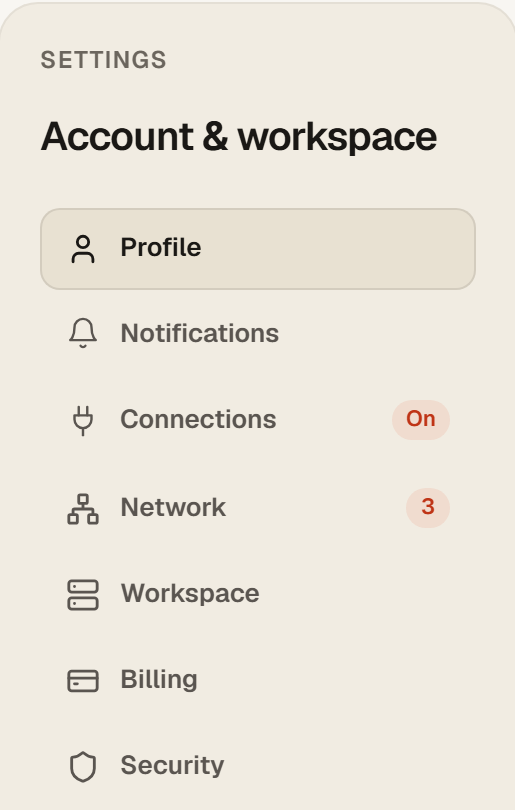
| Section | What is there |
|---|---|
| Profile | Your sign-in email and user id, read-only, and the theme: Light, Dark or System. |
| Notifications | Telegram notifications for runs that finish, sign-ins that expire and nonstop tasks that stop. Email stays as the fallback. |
| Connections | Your own AI accounts. Connect a ChatGPT account here; the badge reads On when one is connected. |
| Network | Default proxy mode, your proxies, and which agent uses which. The badge counts your proxies. |
| Workspace | The cloud workspace itself: status, the VS Code link, the one-shot password, restart. |
| Billing | Plan and invoices. |
| Security | Sign-in methods, sessions, your data, and the delete account action. |
Connect your own ChatGPT account
Run any agent tab on your own ChatGPT subscription instead of the engine included with your plan. The sign-in happens inside your own workspace and on the provider's website; BlackNode never sees your password.
- Before you connect: in ChatGPT, open Settings, Security, and turn on device code login. Without it the code will not be accepted.
- In BlackNode open Settings, Connections, and click Connect under ChatGPT account.
- Click Copy sign-in link. Switch to the browser or profile where you use your paid ChatGPT account, paste the link into the address bar and confirm there. If the code is not already filled in, paste it.
- Return to Settings. The page updates automatically when the sign-in is complete and shows Connected since.
- On the agent page, open Engine and model on a tab and assign the account.
Two tabs on the same connected account take turns automatically. When the provider signs the account out, the tab shows Reconnect and the agent waits; connect again here and tell the agent to continue.
Connect your own Claude account
A Claude account is connected from the agent page: open the avatar menu in the top right and choose Connect Claude Account. The sign-in tool inside your workspace opens the provider's sign-in flow; finish it there and the tab is connected. If a tab loses the connection later, it offers Connect Claude in chat.
Network and proxies
Route your agents through your own proxies. Default proxy mode is what new tabs use unless you assign a proxy to that tab specifically. Under My proxies add HTTP, HTTPS or SOCKS5 proxies; each is tested through the workspace, never through your browser. Per-agent assignment gives each tab its own route, so a Facebook agent can sit on one country and a research agent on another. After changing a tab's proxy use Restart browser (applies new proxy) on that tab.
Workspace and security
Workspace shows your cloud workspace: whether it is running, the link to open it in VS Code and the one-shot password for it. Security lists your sign-in methods and sessions and holds your data controls. Delete account destroys the user, the workspace, brand kit, memory items and connected social tokens. It cannot be undone.
Questions
Can my sister or a teammate use my connected account?
Connected accounts belong to your BlackNode account and its workspace. Another person needs their own BlackNode account and workspace, with their own connected accounts.
Why does a tab say Queued for ChatGPT?
Another tab is already running on that connected account. It starts when the first finishes. Assign a second account or use Standard on one of them to run both at once.
Does a proxy change sign the agent out?
Sometimes the platform notices the new location and asks to sign in again. Open Watch on that tab and sign in once more.